
Price Boosts are a great way to increase your monthly profit and take very little time to do. Price boosts occur when bookmakers knowingly boost a market in an event for a short period of time. We can make money here by backing at the boosted higher odds and laying at lower lay odds for an instant profit using the calculator tool in "normal" mode.
You will see price boosts happen in a variety of sports and the key is to get on them as and when they are announced. You can find them promoted on the bookmaker website or you may receive a text message, email or internet message direct from the bookmaker. The easiest way however is to follow and watch the price boost thread on the forum where Outplayed staff and members will post boosted odds as, and when, they happen.
Price boosts should not be confused with arbitrage bets where the odds are also higher than the lay odds. In price boosted odds the bookies are aware of the difference in the back and lay odds opposed to arbitrage bets where the traders are just slow to react to the changing odds. This means we can do price boosts regularly without the fear of being gubbed/restricted as long as you don't "overdo" them.
Mobile Notifications
You can set up push notifications to your mobile device so you never miss a price boost. This will be linked to the price boost thread on the forum so that you receive a notification every time there's a new post in that thread.
Click here to learn more about connecting your Outplayed account with mobile notifications.
Tips & Tricks
A few tips when looking:
- Don't ignore the advertising banners on the bookie site. They will often advertise current special offers.
- Look in the individual market pages for sports/big events. You will often find enhancements here.
- Keep an eye on the social media outlets for the bookie. They will often posts boosts on these channels.
- Check your emails (and junk) for any boosts that might be emailed directly to you (this applies to all invite only offers).
- The Enhanced Offers Calculator and Bonus Lock-in Calculator can be used for certain offers where it is not a straight price boost. For example: Get enhanced odds if "Team A" wins.
- Don't confuse price boosts/enhanced odds with "special markets". Whilst you might be able to lay off these "special markets", they are not usually at enhanced odds and are more of a bespoke/novelty market. For example: Which Premier League Manager will get sacked next markets
- Price Boosts Thread (NO CHAT)
- Price Boosts Discussion Thread
Price Boost Tracker
The Price Boost Tracker tool shows all the available price boosts in one place, along with all the information you need about each boost (Event Time, Max Stake, Back Odds, Lay Odds, Profit, Liability Needed).

The tracker will show the current exchange lay odds and current profit value so you'll know exactly how profitable a boost is before you need to visit the bookie/exchange.
Profiting from price boosts is a simple case of backing and laying the bet in 'Normal' mode on the calculator (provided the calculator shows that it's profitable). You can learn more about laying bets manually here.
Filters
At the top you'll see various filters. You can amend these to tailor which boosts will show. For example you may only want to show boosts with Matchbook exchange, or £1+ profit.

Click the "Clear Filters" button on the right hand side to reset these filters.

If you want to remove a boost so it no longer shows, then click the X on the right hand side of the row.
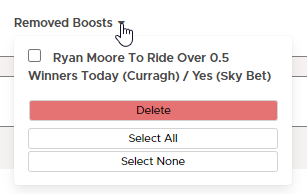
You can find your list of removed boosts and have the option to restore them by hovering over the Removed Boosts dropdown.
Alerts
You can set up notifications for various devices to receive alerts when new boosts appear on the Price Boost Tracker, or if a boost meets the criteria you've set. Begin by clicking "Alerts".

WINDOWS PC
- Input your criteria for an alert
- Select ‘Subscribe’ until you get a successful message - there have been some reports of this taking a couple of clicks.
MAC
- Download Chrome browser
- Navigate to Outplayed.com
- Install the Outplayed app, by clicking this button in the top right of the page:

- Open the app from your home screen - it may also pop up automatically for you
- Log in
- Navigate to the Price Boost Tracker
- Select Alerts
- Input your criteria for an alert
- Select ‘Subscribe’ until you get a successful message - there have been some reports of this taking a couple of clicks.
IPHONE
- Download Outplayed’s Progressive Web App using the guide here.
- Open the app from your home screen
- Log in
- Navigate to the Price Boost Tracker
- Select Alerts
- Input your criteria for an alert
- Select ‘Subscribe’ until you get a successful message - there have been some reports of this taking a couple of clicks.
ANDROID
- Download Outplayed’s Progressive Web App using the guide here.
- Open the app from your home screen
- Log in
- Navigate to the Price Boost Tracker
- Select Alerts
- Input your criteria for an alert
- Select ‘Subscribe’ until you get a successful message - there have been some reports of this taking a couple of clicks.
Calculator
Clicking the small calculator icon on the left hand side of a boost will open up the calculator.
Here you'll be able to see your lay stake and amend any figures if you'd like.
Flagging A Boost
If you think that a boost being shown on the tracker isn't correct, for example if the bookmaker back odds are no longer what the tracker says, then you can flag this boost for moderation.
Simply click the flag icon next to the boost:

This will then bring up a text box for you to explain what's wrong with the boost. Then after clicking "Flag Boost" it'll be sent to our team to fix if necessary.
Found A Boost To Share?
If you've found a profitable price boost on a bookmaker and would like to share it, click the "Head To Forum" button and it'll take you to the Price Boosts No Chat thread on the forum where you can post the details of the boost.